



Most Salesforce programs don’t stall on configuration. They stall on data. Sales leaders stop trusting the pipeline report because the same deal shows up under two accounts. Service reps keep a spreadsheet on the side because the contact on the case is out of date. Marketing sends a renewal offer to a customer who left last quarter.
People learn to work around bad records. Agentforce does not. An agent answering a service question or drafting a renewal quote reads the account, the contacts, the open cases and the order history, and acts on what it finds. If those records are wrong, the agent is wrong with confidence, in front of the customer.
This article sets out how we design a trusted data foundation for Salesforce: what trusted means in practice, a reference architecture, and the decisions on customer identity, integration, quality and access that hold it together.
What trusted data means in Salesforce
We use a simple test. Data is trusted when a person or an agent can act on a record without checking it somewhere else first. That breaks down into a few questions you can measure.
| Test | What failure looks like | What to put in place |
|---|---|---|
| One record per customer | Three accounts for the same company, each with part of the history | Matching and duplicate rules at entry, plus a master ID from your MDM hub |
| A known source for each field | An integration overwrites a phone number a rep fixed last week | A field ownership map and integrations that only write the fields they own |
| Fresh enough for the decision | An agent quotes an order status from yesterday's batch | Event-driven updates for fields that change during the day, freshness checks on the rest |
| Allowed to be used | A segment emails a contact who opted out in another system | One consent record per person, read by every channel and every agent |
| Traceable | Nobody can say where a credit limit on the account came from | Lineage from source to field, field history and an audit trail for changes and prompts |
Most orgs pass some of these and fail others. The work is to find the gaps that block what you want to build next, and fix them at the source instead of in the report.
A reference architecture
Salesforce should not be the place where customer data gets cleaned. It is where people and agents use it. The cleaning, matching and history belong in a layer in front of it, with clear rules about what flows in and what stays outside.
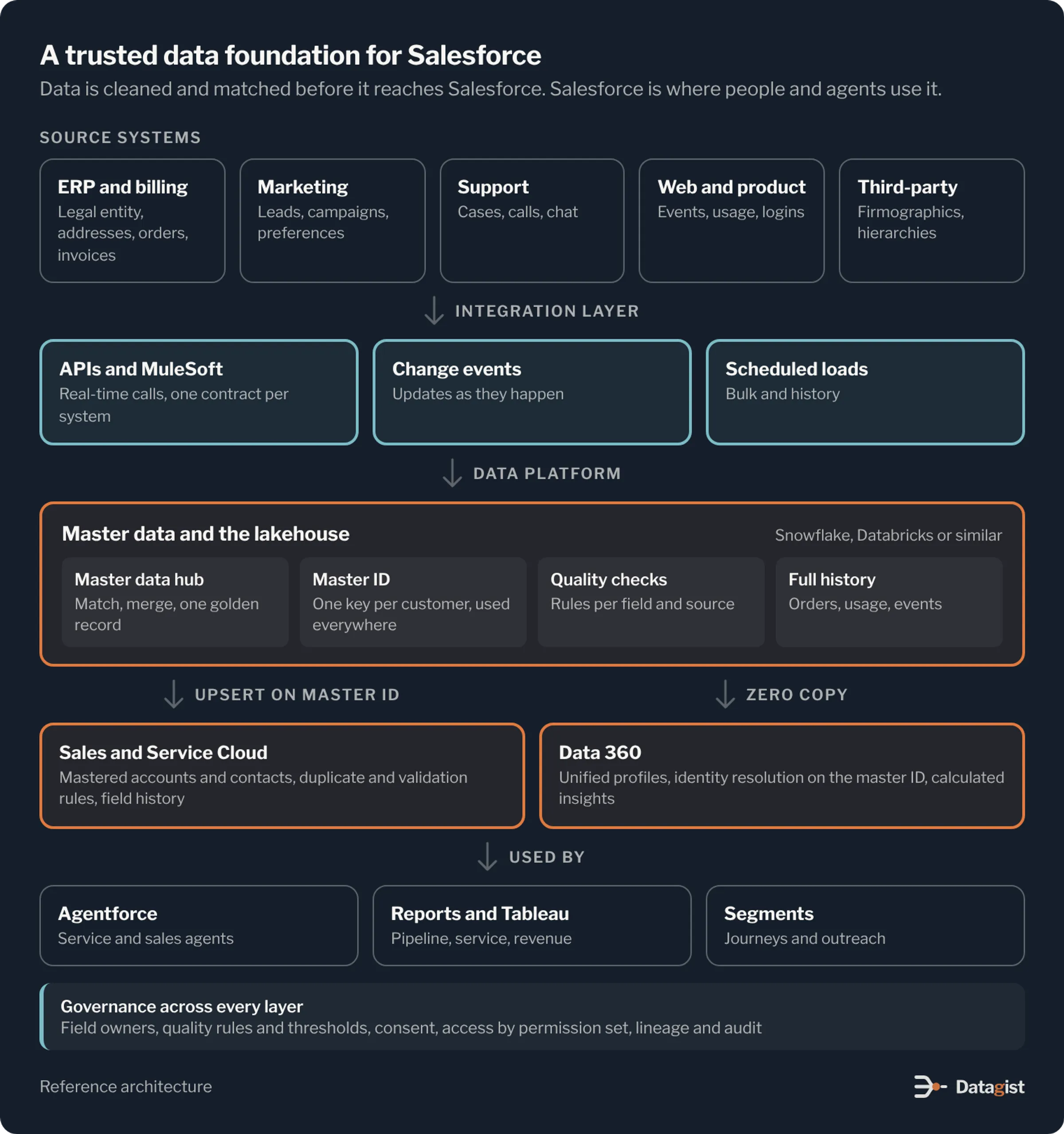
Source systems feed an integration layer. MuleSoft or another API layer handles real-time calls, change events carry updates as they happen, and scheduled loads move the rest. Nothing writes straight into Salesforce from a source system without passing through this layer.
The data platform sits in the middle. A master data hub keeps one golden record and one master ID per customer. A lakehouse or warehouse such as Snowflake or Databricks holds the full history and runs the quality checks. Salesforce gets the mastered accounts and contacts as records. Large or fast-changing data, such as order lines, usage and web events, stays in the platform and is shared with Data 360 through zero copy.
Data 360 builds unified profiles and calculated insights on top of that. Agentforce, reports and marketing segments then read from records and profiles that already agree with each other.
Start with the customer model
Before any tool work, agree on what a customer is. In B2B, decide whether an account is a legal entity, a site or a buying group, and how parent and child accounts relate. In B2C, decide between person accounts and contacts, and how households work. These choices are expensive to change later, and every report, sharing rule and agent depends on them.
Then name a system of record for each important field. This is the step teams skip, and it is the main reason integrations overwrite each other. Write it down as a table and get the business owners to sign it.
| Attribute | System of record | How it reaches Salesforce |
|---|---|---|
| Legal name, tax ID, parent company | MDM hub, fed by ERP and third-party data | Upsert on master ID, read-only in Salesforce |
| Billing address and payment terms | ERP | Change events, read-only in Salesforce |
| Contacts, roles, phone and email | Salesforce | Entered by reps and service agents, checked by duplicate and validation rules |
| Consent and contact preferences | Consent records in Salesforce or a preference center | Synced both ways, newest timestamp wins |
| Open orders and invoices | ERP | Read in place through zero copy or an API, never copied as records |
| Customer tier and health score | Data platform | Calculated nightly, written to one field with a "last calculated" date |
Fields that Salesforce does not own should be read-only for users, and an integration should only write the fields it owns. Data that people only need to look at, such as invoices, can be read in place instead of copied in as records.
One identity across systems
Duplicates are the first thing users notice and the hardest to fix later. Salesforce gives you matching rules and duplicate rules to warn or block at entry. Use them, but they only see Salesforce. The same company also lives in ERP, billing, marketing and support, each with its own spelling and address.
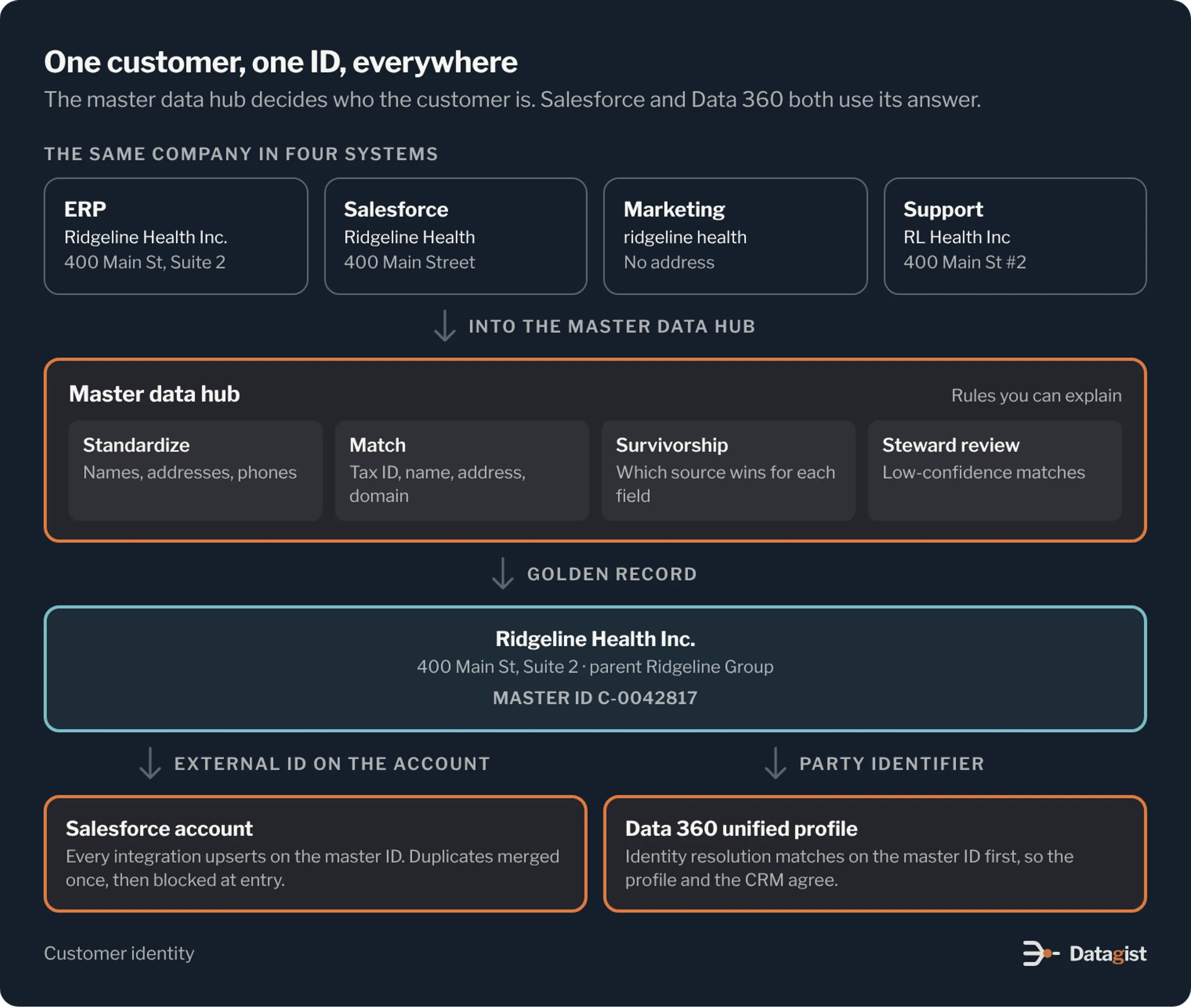
We put cross-system matching in the master data hub. Records are standardized, matched on rules you can explain, and merged by survivorship rules that say which source wins for each field. Matches below a confidence threshold go to a data steward for review. Each customer gets a master ID.
The master ID is the thread that ties everything together. It is stored on the Salesforce account as an external ID, used as the key for every inbound integration, and passed to Data 360 as a party identifier so its identity resolution groups records the same way. Data 360 identity resolution builds unified profiles, but it does not merge the source records in your org. Without a shared master ID, you end up with a clean profile in Data 360 and the same duplicates in Sales Cloud.
Integrations with rules
Most bad data in Salesforce arrives through integrations, not people. A few rules prevent most of it.
Every inbound integration upserts on the master ID or another external ID. It never inserts blindly. Each source system gets its own integration user with a permission set that only allows the fields it owns, so a mistake in one feed can’t overwrite another system’s data. Records that fail validation go to an error queue with an owner, where someone fixes the source. They are not loaded anyway or dropped without a trace.
Outbound, use Change Data Capture or platform events so downstream systems get changes as they happen, instead of nightly full extracts that miss the order of updates. Keep large history out of the org. It slows the org down, adds to storage costs and gives agents more stale data to read.
Quality you can see
Write quality rules for the fields that matter to your next use case, and measure them in the data platform where you can see every source. Typical rules check that active accounts have a valid billing address, that every open opportunity has a primary contact, and that no two active accounts share a tax ID.
Publish the results as a scorecard per field and per source, owned by named people in sales operations, service and finance. Set thresholds that gate new work. For example, an agent topic that quotes contract terms does not go live until contract fields on active accounts are complete and current. This turns data quality from a cleanup project into a release check.
Inside Salesforce, keep validation rules for what a user can fix on the screen, and use field history tracking on the fields agents and reports depend on. When something looks wrong, you can then see who or what changed it.
Consent, access and audit
Trusted also means allowed. Store consent once per person using the Salesforce consent objects or a preference center that syncs with them, tied to the purpose of use. Every channel, segment and agent reads that record before it contacts someone.
Access in Salesforce comes from the sharing model, permission sets and field-level security. Agents follow the same rules. Give each agent its own agent user and permission set with only the objects and fields its topics need. If the agent should not see margin or health data, it should not have access to those fields, whatever its instructions say.
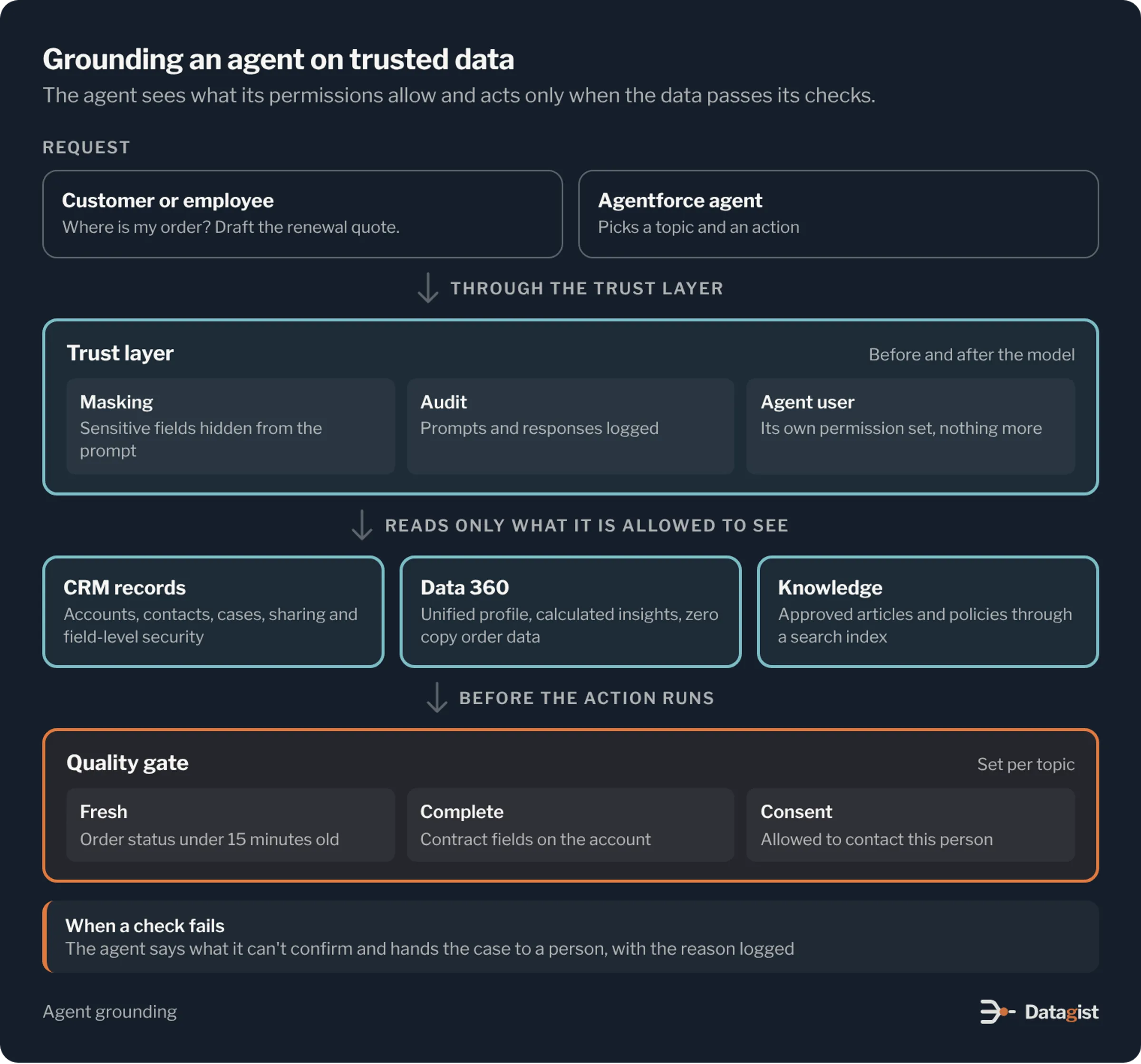
The Einstein Trust Layer masks sensitive data in prompts and keeps an audit trail of prompts and responses. For regulated data, Shield adds platform encryption, longer field history and event monitoring. Combined with lineage from the data platform, you can answer the question every auditor asks: where did this value come from, and who used it?
What to build first
Start with a health check of the org. Measure duplicate rates on accounts and contacts, map every integration that writes to the org, and list the fields with no clear owner. This gives you a baseline and shows where the risk is.
Next, agree on the customer model and the field ownership map, and stand up the master ID. Move the busiest integrations to upsert on that ID with their own integration users. Run a duplicate cleanup once the inflow is under control, so you aren’t cleaning the same records twice.
Then build the quality scorecard around one use case, such as a service agent for order questions or a renewal forecast. Connect Data 360 and the data platform for that use case, set the quality gate, and launch the agent or report on data that has passed it. Widen from there, one use case at a time.
This work is slower to show than a new agent demo. It is also what decides whether the agent is still in use six months later.
We design and build Salesforce data foundations, from master data and integration to Data 360 and Agentforce. See our Salesforce practice, or talk to us about the customer data your next Salesforce project will run on.
Get new insights by email.
One email when we publish a new post.
You're subscribed.
We sent a welcome email to . Didn't mean to sign up? Reply to it and we'll unsubscribe you.