



Most companies that want a model of their own already hold the data for it. Claims notes, support tickets, product manuals, scanned forms and years of labelled transactions sit in the lakehouse. What usually stops them is the hardware. GPUs take months to buy or reserve. Someone has to keep drivers, CUDA and framework versions in line. A cluster sized for one big training run sits idle for the rest of the week. Many teams end up copying data to a separate GPU platform, which brings its own access rules and a gap in the audit trail.
Databricks AI Runtime, generally available since October 2026, takes the hardware problem off your plate. It gives you serverless NVIDIA GPUs inside the Databricks workspace. You attach a notebook or submit a job, Databricks finds the GPUs, and you pay for the time the work runs. The training data stays under Unity Catalog the whole way, and every run logs to MLflow.
This article covers when a custom model is worth building, which GPU to choose, how a workload moves from a notebook to a scheduled job and on to a serving endpoint, and the limits to know before you plan around it.
When a custom model is worth it
Start with prompting and retrieval. A hosted foundation model with good retrieval over your documents handles most question-and-answer work, and it is far cheaper to change. Training or fine-tuning your own model pays off in a narrower set of cases.
The clearest case is a task with a fixed output that runs at high volume. Classifying documents, pulling fields from forms and routing tickets all fit. A small open model tuned on your own labelled history can match or beat a large general model on that one task, at a fraction of the cost per call. Domain language is the second case. Clinical shorthand, part numbers and internal product codes trip up general models, and a few thousand good examples go a long way. The third is control. Some teams need the model weights in their own catalog, versioned and permissioned like any other asset.
If none of these apply, keep prompting. If one does, you need labelled examples, an evaluation set you trust and GPUs to train on. AI Runtime covers the third.
What AI Runtime gives you
AI Runtime is serverless GPU compute. There are no GPU clusters to create, size or shut down. Databricks keeps warm GPU pools and caches environments, so a workload starts in seconds instead of the minutes a classic cluster needs to boot.
There are several ways in. A notebook attaches straight to a GPU for interactive work. A job runs the same code on a schedule, next to the pipeline tasks that prepare its data. The databricks air run command submits training from a laptop using a YAML file. Ray Core, Ray Data, Ray Train and Ray Tune are supported, and you can connect an IDE to a GPU node over SSH.
You pick an environment as well. The standard one is minimal. The Databricks AI environment comes with PyTorch and Transformers installed. If you need something else, build a container and push it to the Databricks artifact registry. NVIDIA NGC containers and NVIDIA NeMo are supported this way.
| GPU option | GPUs on the node | Memory per GPU | Multi-GPU training | Good fit |
|---|---|---|---|---|
| 1xA10 | 1 | 24 GB | No | Writing and testing code, small models, quick experiments |
| 1xH100 | 1 | 80 GB | No | Fine-tuning a smaller open model on a single GPU |
| 8xH100 | 8 | 80 GB | Yes, with @distributed, and multi-node for larger runs | Full fine-tunes and bigger models |
| 8xB300 | 8 | 288 GB | Yes, in Public Preview on AWS with a waitlist | The largest models and long training contexts |
Every option is a single node. Only the eight-GPU options run distributed training on one node, and multi-node H100 training is there for runs that outgrow eight GPUs. GPU availability varies by workspace and region, so check what your workspace offers before you size a project around one type.
From governed data to training data
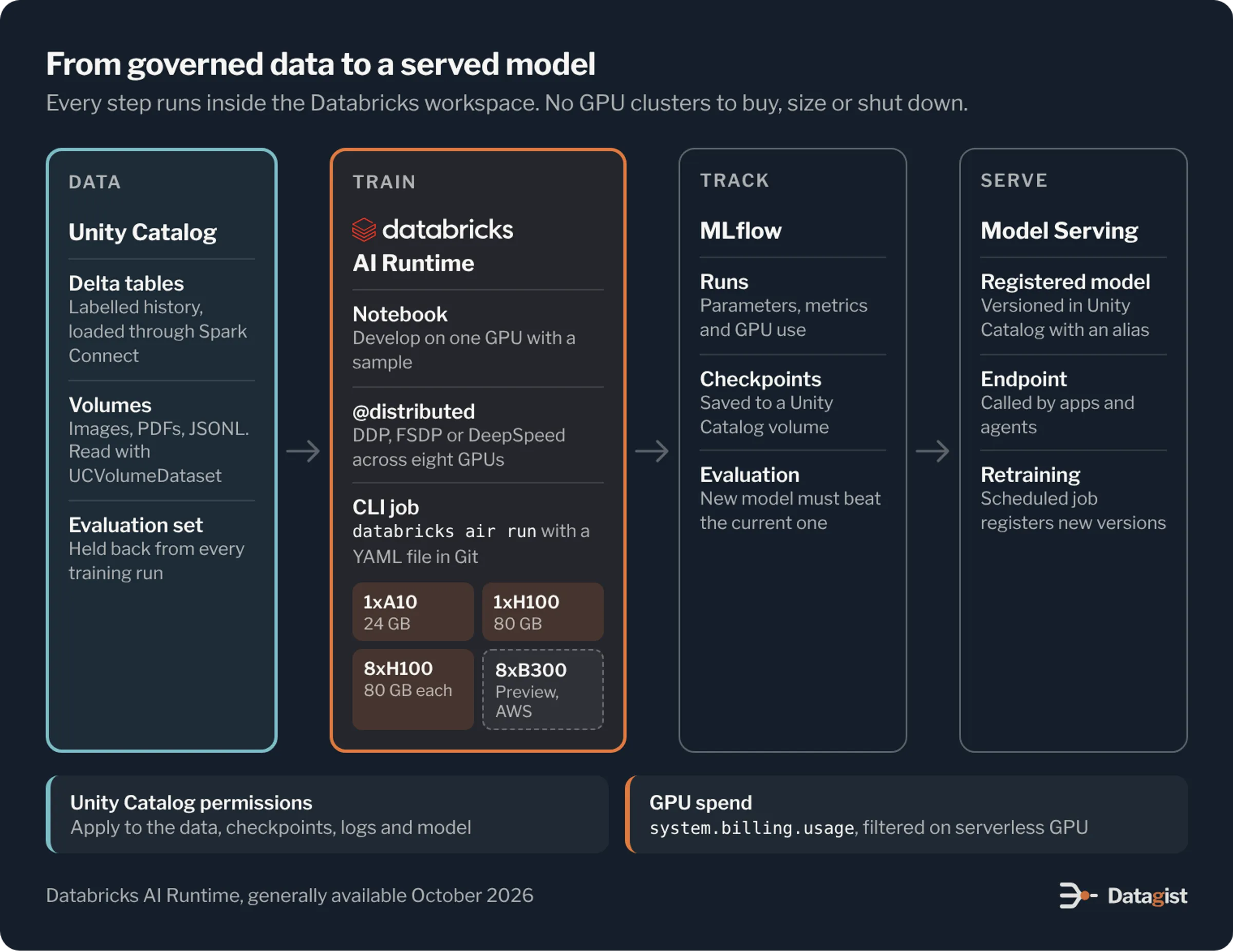
Training data starts as tables and files in Unity Catalog. Tabular data loads from Delta tables through Spark Connect. Files such as images, PDFs and JSONL go into a Unity Catalog volume. The AI Runtime SDK includes UCVolumeDataset, a PyTorch dataset that copies each file from the volume into a fast local cache the first time it is read. Pair it with the SDK’s own DataLoader so the GPUs aren’t left waiting on storage.
Unity Catalog permissions cover the whole workload: the data it reads, the checkpoints it writes and its logs. A data scientist who can’t read a table can’t train on it either. That alone is a good reason to keep training on the platform instead of exporting files to a separate GPU service.
Build the training set with a pipeline, as a table you can rebuild, and record which table version fed each run. Hold back an evaluation set that no training run ever sees. Remove or mask personal data before it reaches the training table. A model can memorise and repeat what it was trained on, and row filters and column masks don’t follow the data into the model weights.
From notebook to scheduled training
Most teams develop on a single A10 or H100 in a notebook, using a small sample of the data. Once the training loop works, attach the notebook to 8xH100 and wrap the training function in the @distributed decorator from databricks.air. It runs PyTorch DDP, FSDP or DeepSpeed across every GPU on the node, and num_accelerators lets you use fewer. The decorator is in Beta and has a three-hour timeout by default, so pass timeout for longer runs.
For runs that should repeat, move to the CLI and a YAML file. The compute block names the GPU, such as GPU_8xH100, and how many to use. The environment block pins the environment version and packages, or points to a container image stored in Unity Catalog. The code can come from a local folder, a volume or a Git branch or commit. experiment_name sets the MLflow experiment, max_retries defaults to three, and timeout_minutes caps the wall-clock time. Keep this file in Git next to the training code, check it with --dry-run, and deploy it with Declarative Automation Bundles like the rest of your jobs.
If you have code written for the older serverless_gpu package, check your imports. On GPU environment version 6 and above the SDK is databricks.air, and the old package is deprecated. It used gpus and gpu_type where the new one uses num_accelerators and accelerator_type.
Tracking, checkpoints and serving
Each run logs to an MLflow experiment, including parameters, metrics and GPU use. Adding --watch to the CLI command streams the logs to your terminal. Write checkpoints to a Unity Catalog volume. The SDK’s UCVolumeWriter and UCVolumeReader work with PyTorch distributed checkpoints, so saves can run in the background while training continues. Checkpoint often. Runs have time limits, GPU capacity can be tight, and a long run without checkpoints that stops near the end has to start over.
When a model passes your evaluation, register it in Unity Catalog through MLflow so it gets the same grants and lineage as your tables. Then deploy it to a Model Serving endpoint, which apps and agents call like any other model. A retraining job registers a new version each time, and you move the production alias to it only after it beats the current one on the evaluation set.
Security and cost
AI Runtime isolates workloads at the virtual machine level and supports PrivateLink and serverless egress controls. Workspaces with the compliance security profile can use it once an admin turns on the AI Runtime previews, but it isn’t supported for FedRAMP High or DoD IL5.
GPU time is billed like other serverless usage and lands in the system.billing.usage system table. Filter on product_features.serverless_gpu to see GPU spend, and put that on a dashboard by job and user before the first big run. Usage policies in the YAML file help charge spend back to the right team. When demand is high, AI Runtime can place work on GPUs in another region, which can add data egress charges.
Limits to plan around
Only A10, H100 and B300 GPUs are offered. Connections time out after 15 minutes for interactive notebooks and after 24 hours for notebook and CLI jobs. A connected notebook session or notebook job can run for up to two days, and a CLI job for up to 14 days. Anything longer has to resume from a checkpoint.
Scheduled jobs on AI Runtime can’t take packages from the Environments panel, so install them with %pip install in the notebook or list them in the YAML file. Running a scheduled job on a workspace base environment, including the Databricks AI environment, is in Beta and needs a preview turned on. Capacity can also be short in some regions at busy times, so leave slack in any training schedule that a release date depends on.
Where to start
Pick one narrow task with labelled history, such as sorting incoming documents or pulling fields from a standard form. Build the training and evaluation tables in Unity Catalog. Measure a hosted foundation model with a good prompt against the evaluation set first. That score is the bar the custom model has to clear.
Then fine-tune a small open model on a single H100 and compare accuracy, response time and cost per thousand calls. Move to 8xH100 only when the small model shows the approach works and you need more. Once a model wins, put the run in a YAML file, register the model in Unity Catalog and serve it. Watch the billing table from the first week, and retrain on a schedule as new labelled data arrives.
We build data and AI platforms on Databricks, from the pipelines that prepare training data to the endpoints that serve the models. If you have a task in mind for a custom model, talk to us about the data, the evaluation and the first run.
Get new insights by email.
One email when we publish a new post.
You're subscribed.
We sent a welcome email to . Didn't mean to sign up? Reply to it and we'll unsubscribe you.