



A sales rep on a live call has a few seconds to answer. The buyer asks whether the product supports single sign-on with their identity provider, or what it would cost to add two hundred seats, or why their usage dropped last quarter. The rep can put them on hold and dig through the CRM, a pricing sheet and three shared drives, or say “I’ll get back to you.” Either way the moment is lost.
A real-time sales agent closes that gap. It sits in the tools the rep already uses, reads the account and the conversation, and comes back with an answer, the source behind it and a suggested next step while the call is still going. The same agent can brief a rep before a meeting, qualify an inbound chat on the website and draft the follow-up email afterwards.
This article walks through how to build one on Databricks with Mosaic AI Agent Framework: the data the agent needs, the tools it calls, how it runs as the rep so it only sees what the rep may see, and how to test and deploy it. One note on names first. Databricks has folded Agent Framework into Agent Bricks during 2026. For a new custom agent, Databricks now recommends the Agent Bricks CLI, which is in Beta and deploys to Agent Runtime. The older MLflow agent server and agents deployed to Model Serving still run but are marked legacy. The design below holds either way, and the commands use the current tooling.
What real time means here
Two clocks matter. The first is response time. On a live call the rep needs the first words of an answer within a couple of seconds, and the full answer soon after. That rules out an agent that makes six slow tool calls in a row before it says anything. The second clock is data freshness. If the buyer emailed a complaint an hour ago, or a renewal quote went out this morning, the agent has to know. An answer built on last night’s batch load can be worse than no answer.
Set targets for both before you write code. A reasonable start is first words on screen in under two seconds, a full answer in under eight, and account data no more than fifteen minutes old. Then design every part of the agent against those numbers.
Pick one job first
“Help sales” is too wide to build or test. Pick a single job with a clear user and a clear finish. Good first choices are the pre-call brief, where the agent summarises the account, open deals, recent tickets and the last conversation before a meeting starts, and live call assist, where the rep types or pastes a buyer question and gets a grounded answer with a source.
The pre-call brief is the easier start. It can run a minute before the meeting, so the latency budget is loose, and a wrong answer is caught before the buyer hears it. Live call assist is where the value is, and it reuses everything the brief needs. Build the brief, prove the data is right, then tighten it for live use. Keep the agent read-only at first. Writing to the CRM comes later, behind an approval step.
The data the agent stands on
Most of the work in a good sales agent is data work. The model is the easy part. The agent needs four kinds of data, and each is served in a different way.
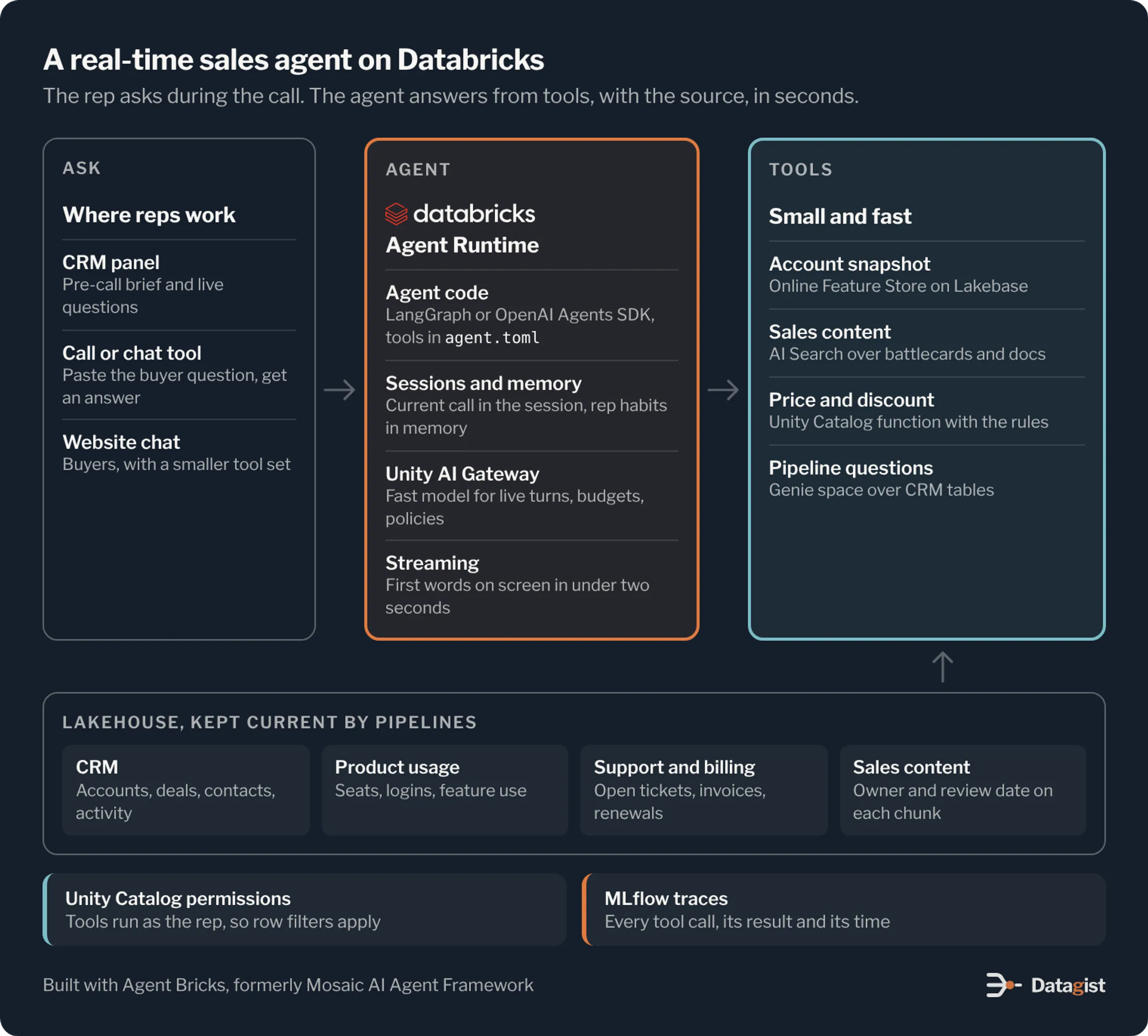
Account and deal data comes from the CRM. Land it in Delta tables with Lakeflow Connect or your existing ingestion, on a schedule that meets your freshness target. Join it with product usage, support tickets and billing to build one account view. Then compute the facts a rep actually asks about, such as seats used against seats bought, the usage trend over ninety days, open tickets by severity and days since the last meeting. Store those as feature tables in Unity Catalog and publish them to the Online Feature Store, which runs on Lakebase and serves single-row lookups in milliseconds. The agent should never run a large query against the warehouse in the middle of a call.
Sales content covers battlecards, product documentation, security answers, approved case notes and pricing guides. Parse the documents into chunks, keep the owner and the review date on each chunk, and index them in AI Search, which older docs call Vector Search. Drop anything past its review date from the index. A rep quoting a retired feature to a buyer is worse than a rep who says they’ll check.
Rules, such as list prices, discount bands and who approves what, belong in code. Write them as Unity Catalog functions in SQL or Python. The model should never work out a discount on its own. It calls the function and repeats what it gets back.
For open questions about the pipeline, such as “what did this account buy in the last two years” or “which deals in my territory are stuck in legal”, a Genie space over the CRM tables gives the agent a way to ask in plain language and get back an answer with the SQL behind it.
Keep the tools small and fast
The agent works by calling tools, and the tools decide most of its speed and accuracy. Give it a small set, each with one job, a clear name and a description that says when to use it. Each tool should return a small, structured result. A tool that hands back a whole account record makes the model slower and more likely to pick the wrong field.
| Tool | Built with | Runs as | What it returns |
|---|---|---|---|
| Account snapshot | Unity Catalog function over Online Feature Store tables | The rep | Open deals, usage trend, open tickets, last touch |
| Sales content search | AI Search index over battlecards, case notes and product docs | The app | Short passages with a link to the source |
| Price and discount check | Unity Catalog function with the pricing rules | The app | List price, allowed discount, who must approve more |
| Pipeline questions | Genie space over CRM tables | The rep | An answer and the SQL behind it |
| Log a call note | Unity Catalog function that writes to a staging table | The rep, after approval | The note as saved |
In an Agent Bricks project, tools are declared in the agent.toml file. Each entry has a kind such as uc_function, genie_agent or mcp, and an auth setting that says whether it runs as the app or as the user. Databricks managed MCP servers cover Unity Catalog functions, AI Search, Genie and SQL, and agentbricks tools add wires one in. Tools that read customer data should run as the user. Tools that read shared content, like the sales library, can run as the app.
Building the agent
Start a project with agentbricks init --framework langgraph sales-agent. The OpenAI Agents SDK is the other template if your team prefers it. The project includes the agent code, the agent.toml file and a local server. agentbricks dev runs it on port 8000 against model endpoints in your workspace, so you can try it on real accounts from day one. Run agentbricks doctor before each deploy to check the project.
Write the instructions like a brief for a new rep. Say what the agent is for, which tool answers which kind of question, and the house rules. The most important rule is that every number and every product claim must come from a tool result, with the source shown to the rep. If no tool has the answer, the agent says so. Reps forgive “I don’t know” far more readily than a made-up feature.
Model calls go through Unity AI Gateway, which handles routing, rate limits and per-user and per-group budgets. Use a fast model for live call assist and keep a larger one for the pre-call brief, where a few more seconds don’t matter. Stream the answer. The agent server supports streaming, and showing the first sentence while the rest is written is the cheapest latency win there is.
A few habits keep a live turn inside the budget. Call independent tools in parallel. Build the account snapshot when the meeting is booked or when the call connects, and keep it in the session, so the live turn only has to answer the question. Cap the number of tool calls per turn. If the agent hits the cap, it answers with what it has and says what it couldn’t check.
Running as the rep
A sales agent must see what the rep may see and nothing more. A rep in one territory shouldn’t learn about deals in another because the agent ran with broad access. Databricks agents support two modes. App authorization uses the app’s own service principal for every request. User authorization, in Public Preview and switched on by a workspace admin, passes the signed-in user’s identity through to the tools, so Unity Catalog row filters and column masks apply to the agent exactly as they apply to the rep in a dashboard.
Use user authorization for every tool that reads accounts, deals or customer contacts. Put territory and account ownership rules into row filters on the underlying tables. Instructions in a prompt can be talked around, and row filters can’t. One thing to watch: if the user token is missing, the helper that builds the user’s client falls back to the service principal without an error. Add a small tool that returns the current user’s identity, test it while you build, and remove it before go-live.
Sessions and memory
Agent Runtime gives each deployment managed sessions and long-term memory. Sessions hold the current conversation, so a rep can ask “and what about their EMEA entity?” without repeating the account. Memory is kept per user and lasts across sessions. Use it for things that make the agent more useful to that rep over time, such as the accounts they own, how they like a brief laid out and the products they sell most. A memory pipeline, in Beta, can turn finished sessions into memory on demand or about once a day.
Be strict about what goes into memory. Buyer personal details and deal terms belong in the CRM, where they have owners and access rules. They shouldn’t sit in an agent’s memory store where they are hard to find and harder to delete.
Guardrails that sales teams will ask about
Sales leaders and legal will raise the same few worries. They want to know that the agent can’t promise a discount, can’t change the CRM on its own and can’t leak one customer’s data to another. Handle each one in the platform, where a clever prompt can’t undo it. Discounts come only from the pricing function, and anything above the rep’s band returns the approver instead of a number. CRM writes go through a function that saves to a staging table, and a rep confirms each one before it syncs back. Unity AI Gateway can hold contextual policies written in SQL, such as requiring human approval before an update reaches the CRM. Customer separation comes from row filters running as the user.
Inbound website chat needs extra care, because the person typing is not your employee. Run that agent with app authorization and a much smaller tool set, with no pipeline data and no pricing beyond the public list. Screen the input for prompt injection, and hand off to a person as soon as the buyer asks for something the agent shouldn’t decide.
Testing before reps see it
Build an evaluation set from real questions. Pull them from call recordings, chat logs and the questions reps post in the sales channel, and have a senior rep write the correct answer for each, with its source. A few hundred cases across your main products and deal stages is a good start. Hold some back for later.
Every request the agent serves is traced in MLflow, including each tool call, its inputs, its result and the time it took. Score each case on whether the answer was right, whether every number came from a tool, and how long the turn took. Latency at the slowest tenth of turns matters more than the average, because the rep remembers the call where the agent froze. For agents deployed on Databricks Apps, the review app chat interface isn’t available, so use labeling sessions on saved traces to collect feedback from reps.
Run the evaluation on every change to instructions, tools or models. A new model that writes nicer answers but skips the pricing function once in twenty turns is a step back.
Deploying
agentbricks deploy sales-agent creates the memory and session stores declared in agent.toml, sets up tracing and deploys the agent to Agent Runtime as a Databricks App with its own URL. The runtime keeps run state, so an interrupted run can recover after a restart. Start with two instances using --instances 2. A deployment can run up to five. Send the session ID in the X-Routing-Key header so each conversation stays on one instance.
Clients call the agent with a Databricks OAuth token. Put the agent where reps already work, such as a panel in the CRM, the team chat tool or the call assistant, so nobody has to open another tab during a call. Watch the traces daily for the first few weeks. The questions reps actually ask will be different from the ones in your evaluation set, and the gaps show you which tool or document to add next.
Where to start
Choose one sales team and the pre-call brief. Build the account view and publish its features online. Index the sales content that team uses most, and write the pricing function. Build the agent with three or four tools, run it as the user, and test it against fifty real meetings before reps see it.
When the briefs are right, add live call assist for the same team and measure what changes: how often reps answer without a follow-up, how long calls take to get to a next step and how much time goes into prep. Then add CRM write-back behind approval, and only then open it to more teams.
We build data and AI platforms on Databricks, from the pipelines that keep account data current to the agents that use it. If you want a sales agent your reps will trust on a live call, talk to us about the data and the first use case.
Get new insights by email.
One email when we publish a new post.
You're subscribed.
We sent a welcome email to . Didn't mean to sign up? Reply to it and we'll unsubscribe you.